MobSF Binary Scan
MobSF (Mobile Security Framework) is an open source security suite for mobile applications. The MobSF Binary Scan step runs a full MobSF static analysis on the app your workflow has built, an APK, an AAB, or an IPA.
Because it reads the compiled app rather than the code, this scan reports what actually ships to your users: the manifest and the requested permissions, the signing certificate, hardcoded secrets, binary protections, the network security configuration, the trackers found in the app, and a scored AppSec report. This is the same analysis a reviewer or an app store performs on the file you distribute, so running it before distribution shows you what they would see.
To analyze the code instead of the built app, use the MobSF Source Code Scan step. The two steps complement each other, and a workflow can run both.
Prerequisites
Before running the MobSF Binary Scan step, you must complete certain prerequisites, as detailed in the table below:
To keep the report after the build, add the Export Build Artifacts step after this step.
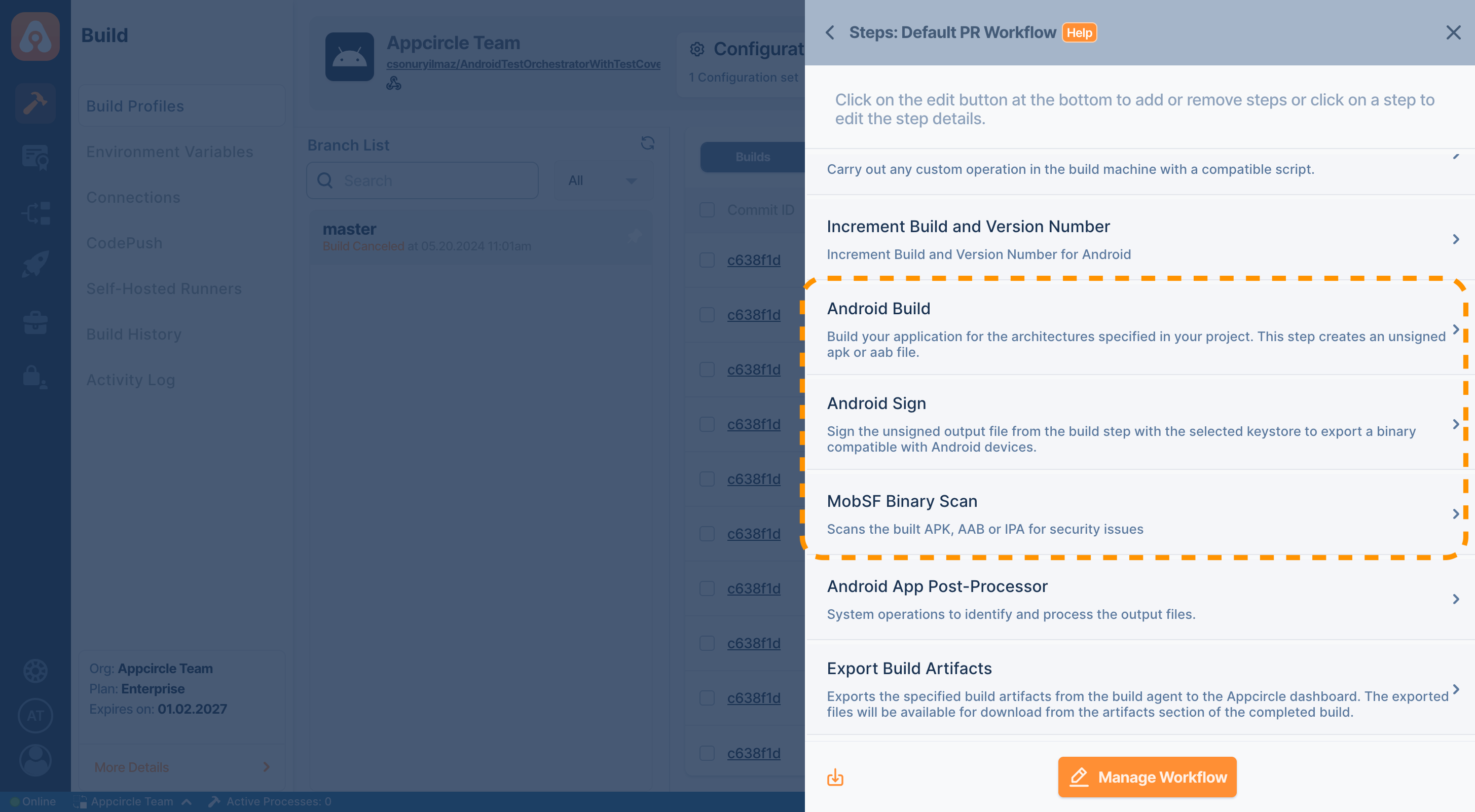
For Android (Java / Kotlin and React Native)
| Prerequisite Workflow Step | Description |
|---|---|
| Android Build | Generates the app (APK or AAB) required for the MobSF Binary Scan step. |
| Android Sign | Signs the app (APK or AAB). If the app is already signed, this step can be skipped. |
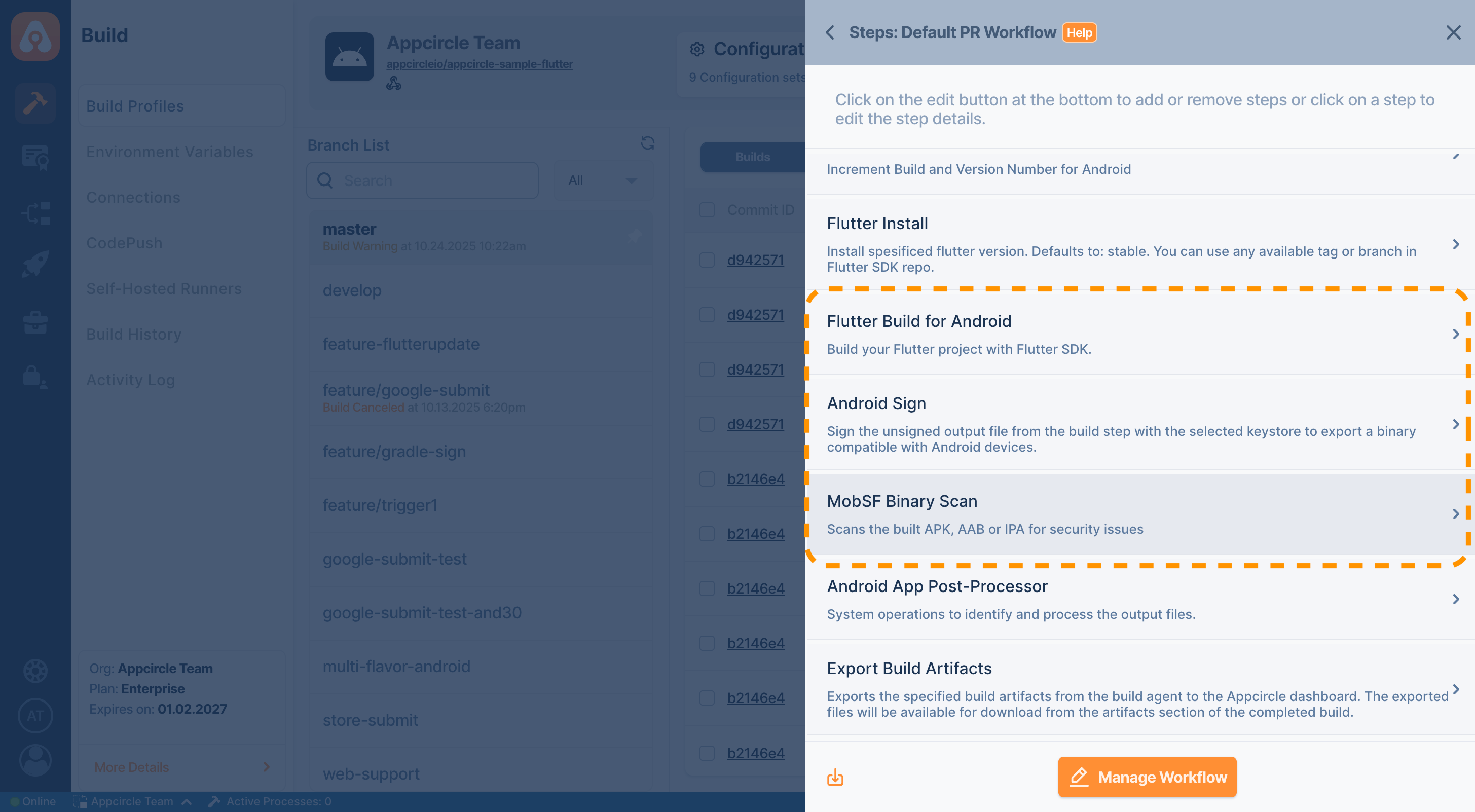
For Android Flutter
| Prerequisite Workflow Step | Description |
|---|---|
| Flutter Build for Android | Generates the app (APK or AAB) required for the MobSF Binary Scan step. |
| Android Sign | Signs the app (APK or AAB). If the app is already signed, this step can be skipped. |
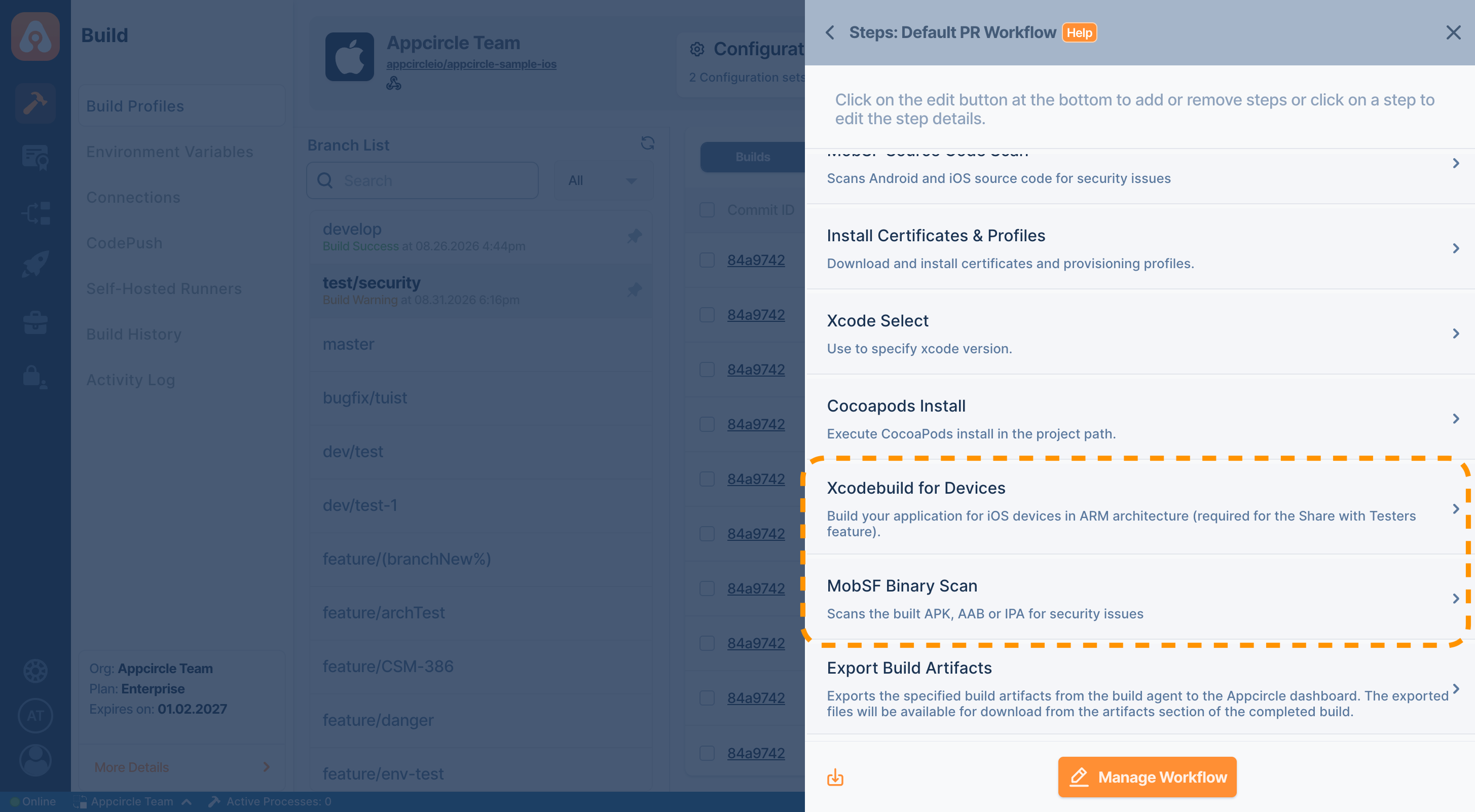
For iOS (Objective-C / Swift and React Native)
| Prerequisite Workflow Step | Description |
|---|---|
| Xcodebuild for Devices | Builds the application in ARM architecture and generates an IPA file. |
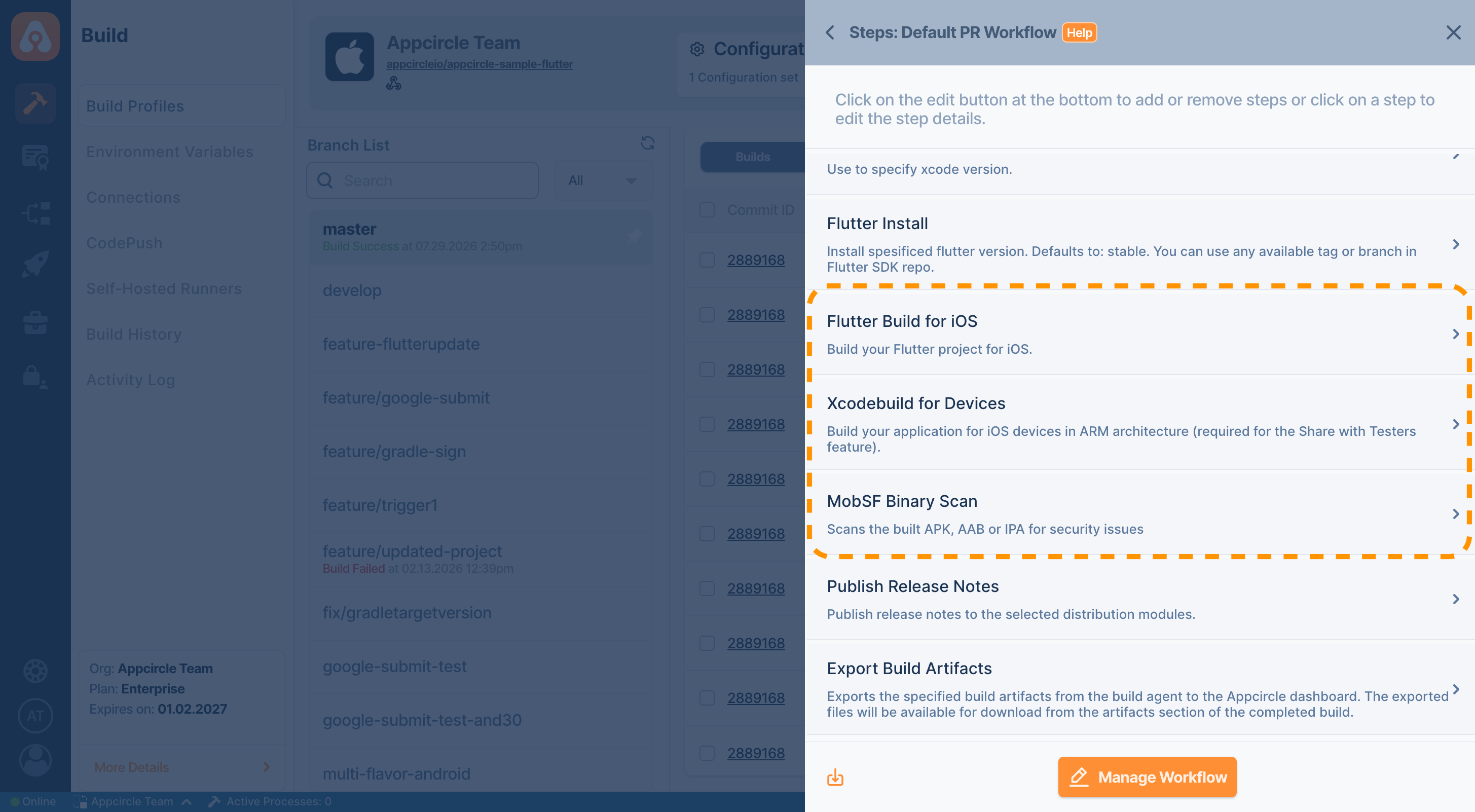
For iOS Flutter
| Prerequisite Workflow Step | Description |
|---|---|
| Flutter Build for iOS | Prepares the Flutter project for the iOS environment and builds it using the Flutter SDK. |
| Xcodebuild for Devices | Builds the application in ARM architecture and generates an IPA file. |
Input Variables
This step contains some input variable(s). It needs these variable(s) to work. The table below gives explanation for this variable(s).
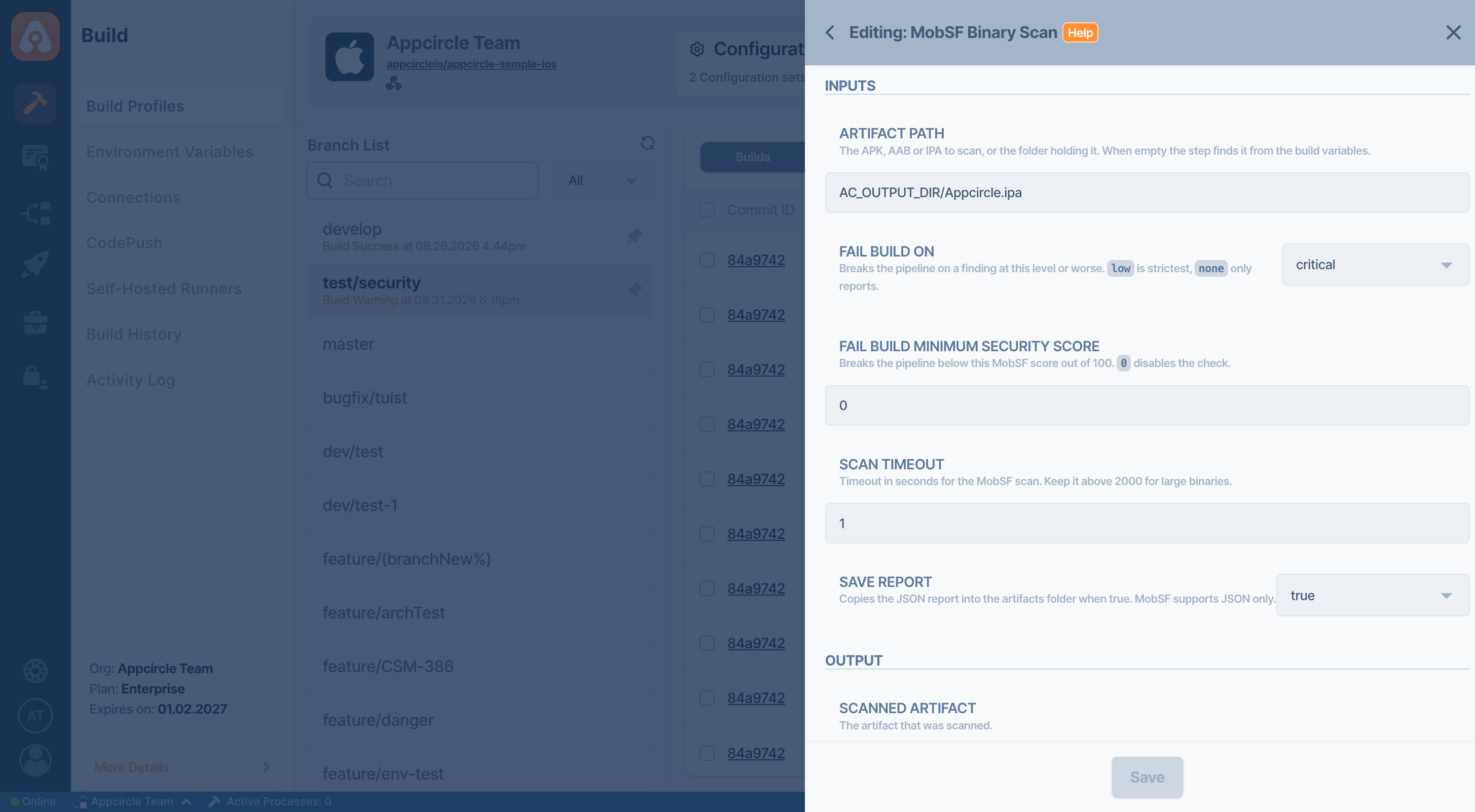
| Variable Name | Description | Status |
|---|---|---|
$AC_MOBSF_ARTIFACT_PATH | Path of the APK, AAB, or IPA to scan, or of the folder holding it. When empty, the step looks at $AC_APK_PATH, then $AC_AAB_PATH, then the .ipa file under $AC_OUTPUT_DIR/MyApp.ipa. A folder is accepted because iOS builds do not expose the IPA path as a variable. | Optional |
$AC_MOBSF_FAIL_ON | Breaks the pipeline on a finding at the selected level or worse. Options: critical, normal, low, none. Default: critical. | Optional |
$AC_MOBSF_MIN_SCORE | Breaks the pipeline when the MobSF security score out of 100 falls below this value. Empty, the default, disables the check. | Optional |
$AC_MOBSF_SCAN_TIMEOUT | Timeout in seconds for the MobSF scan. Default: 1800. MobSF applies its own decompile and SAST timeouts of 1000 seconds each, so keep this value above their sum for large apps. | Optional |
$AC_MOBSF_SAVE_REPORT | Copies the JSON report into the artifacts folder. Options: true, false. Default: true. | Optional |
Output Variables
The output(s) resulting from the operation of this component are as follows:
| Output Variable | Description |
|---|---|
AC_MOBSF_SCANNED_ARTIFACT | The artifact that was scanned. |
AC_MOBSF_SECURITY_SCORE | The MobSF security score out of 100. |
AC_MOBSF_FINDING_COUNT | Total number of findings. |
AC_MOBSF_CRITICAL_COUNT | Number of critical findings. |
AC_MOBSF_NORMAL_COUNT | Number of normal findings. |
AC_MOBSF_LOW_COUNT | Number of low findings. |
AC_MOBSF_WORST_LEVEL | The worst level found: critical, normal, low, or none. |
Reports
The report is written into the $AC_OUTPUT_DIR directory as mobsf-binary-analyze.json, unarchived and under its own name, so the Export Build Artifacts step publishes it without extra configuration.
JSON is the only format this step reports. MobSF's other export is a PDF, which needs the wkhtmltopdf tool that is not installed on the runners, so the step has no output format input variable.
The report is published before the build is graded, so the findings stay downloadable even when the step breaks the pipeline.
To access the source code of this component, please use the following link:
FAQ
What is the difference between the MobSF Binary Scan and MobSF Source Code Scan steps?
The MobSF Binary Scan step analyzes the compiled APK, AAB, or IPA and reports what ships to your users, such as the signing certificate, the requested permissions, and the binary protections. The MobSF Source Code Scan step analyzes the source code in your repository and reports the file and line of every finding, so it runs before the build and points at code you can fix. Running both covers the code and the shipped app.
Which file formats can this step scan?
An APK, an AAB, or an IPA. An AAB is converted to an APK by the bundletool that MobSF ships, using the Java installation provisioned on the runner.
An .xcarchive is not a distributable artifact, so the step reports it as such instead of handing MobSF a file it cannot read. Export the .ipa file first with the Xcodebuild for Devices step.
Does this step need Docker on the runner?
No. The step drives the MobSF installation that runner setup provisioned, and no container runtime is involved.
Why does the step fail on my runner while the source code scan works?
The MobSF Source Code Scan step can install the mobsfscan command line tool at build time, so it works on a runner without MobSF. Binary analysis has no such equivalent: it needs the full MobSF installation, and the step cannot install MobSF itself because its license does not allow Appcircle to distribute it. Provision MobSF on the runner to use this step.
Does a scan return a cached result for an app that was scanned before?
No. MobSF caches a scan by the MD5 hash of the artifact, but the step removes the scan record, the uploaded artifact, and the decompiled sources when it finishes, so every build produces a fresh scan.
The build log mentions a failed decompilation. Did the scan fail?
Not necessarily. MobSF judges the jadx decompiler by its exit code, and jadx exits with an error as soon as a single class fails to decompile, which is routine for an app processed with R8. The step reads the report rather than the tool's verdict, so a summary with counts and a verdict is a valid result.